Thank you for sharing your wisdom with our sangha. Please complete the form below in order to receive payments from One Earth Sangha. Unless your information changes, you should only have to do this once.
Loading...
Get and Complete the appropriate IRS Form
- Form W-9 — for individuals and entities residing/subject to income tax in the US
- Form W-8BEN — for individuals NOT residing/subject to income tax in the US
- Form W-8BEN-E — for entities NOT residing/subject to income tax in the US
If you have access to a printer, you can print out the form, complete and sign it, then take a picture of the completed form and upload that photo to the form above. You’re done!
Alternatively, you can complete and sign the form digitally. There are a couple of tricky bits, so please take note where indicated.
- If you don’t already have a PDF reader that supports forms and signatures on forms, download Adobe Acrobat Reader using the link below
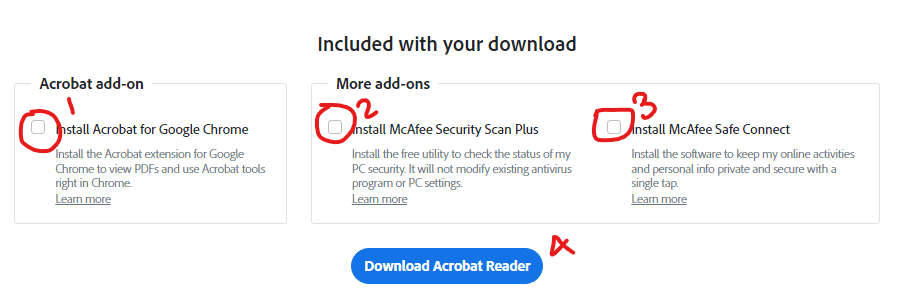
- Note: You will probably want to uncheck the boxes shown here. Otherwise, additional software will be passively downloaded and installed on your system.

- Download Adobe Acrobat Reader from here
- Note: You will probably want to uncheck the boxes shown here. Otherwise, additional software will be passively downloaded and installed on your system.
- Once you have Adobe Reader installed, complete and sign the form
- Note: This IRS form does not allow users to type directly into the date field next to the signature.
The video below shows how to work around this limitation
- Note: This IRS form does not allow users to type directly into the date field next to the signature.
- Save the file and upload it in the form above